
Geospatial User Interfaces for Edge Command and Control
A standards-backed design memo for globe-centered fleet interfaces: alarm triage, edge architecture, human factors, geospatial failure modes, and C2 UX for autonomous robots in air, land, and water.
- Published
- May 6, 2026
- Reading
- 33 min
- Author
- Christopher Lyon
- Filed
- Research
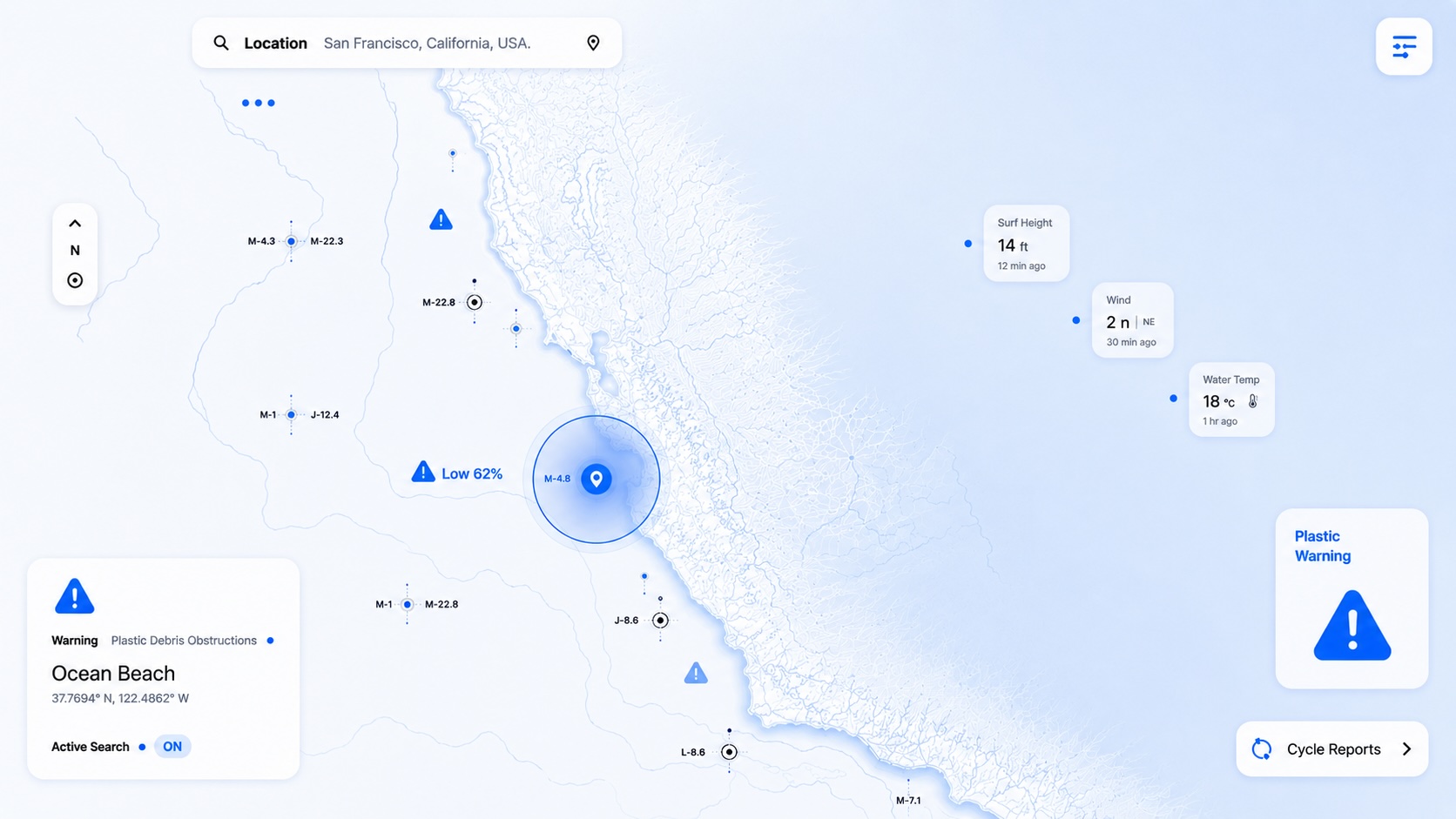
Geospatial user interfaces for autonomous fleets are not map dashboards. They are control-room interfaces for a process spread across space. The process variables are position, intent, mission state, health, autonomy confidence, communication quality, route conformance, hazard proximity, payload state, and operator workload. The assets may be aircraft, ground robots, tractors, marine vessels, underwater vehicles, fixed sensors, radio masts, charging stations, or field operators. The display may be a 3D globe. The operating job is still industrial supervision: help a human see what changed, understand whether it matters, project what happens next, and intervene before the system crosses a safety, economic, or mission boundary.
Most geospatial applications are built for exploration. They let the user pan, zoom, query, layer, filter, and inspect. Command and control has to keep those tools, then add a harder requirement: protect attention when time is short. The interface must separate a harmless data delay from an unsafe loss of command link, an event from an alarm, a map overlay from a safety constraint, and an autonomy suggestion from an operator-authorized command.
For the Lyon Industries open-source fleet-management work, the starting point is not a blank web map. It is the control-room literature: ISA-101 for HMI lifecycle and display philosophy, ISA-18.2 and IEC 62682 for alarm management, EEMUA 191 for alarm-system practice, ISO 11064 and EEMUA 201 for control-center ergonomics, NUREG-0700 for human-system interface review, and the geospatial standards stack from OGC, IHO, ITU, FAA/NASA UTM, ROS 2/DDS, OPC UA, MQTT Sparkplug, MAVLink, and ISO agricultural machinery safety.
Abstract
This paper turns SCADA HMI practice, alarm-management standards, human-factors research, geospatial interoperability standards, and moving-asset use cases into design rules for a globe-centered fleet interface.
The working conclusion is simple: a geospatial C2 interface is a high-performance HMI for a moving, distributed, partially autonomous process. A globe or map is the spatial substrate. The operating model is alarm triage, role-based supervision, verified mission execution, and degraded-mode control at the edge.
SCADA alarm practice transfers well if it is translated carefully. ISA-18.2 and IEC 62682 define alarm systems around lifecycle governance: philosophy, identification, rationalization, detailed design, implementation, operation, maintenance, monitoring, management of change, and audit.1International Society of Automation. ISA-18 Series of Standards and ISA InTech articles on ISA-18.2 alarm management lifecycle and updates. https://www.isa.org/standards-and-publications/isa-standards/isa-18-series-of-standards and https://www.isa.org/intech-home/2018/march-april/features/alarm-m...2ANSI Webstore. IEC 62682 Ed. 2.0 b:2022 - Management of alarm systems for the process industries. https://webstore.ansi.org/standards/iec/iec62682ed2022 For fleets, this means every alarm must have a defined cause, consequence, operator action, response time, owner, priority, suppression rule, and evidence record. Notifications that do not require a timely operator response should be events, advisories, prompts, or work items, not alarms.
High-performance HMI practice also transfers. ISA-101 emphasizes an HMI lifecycle, human-centered design, display structures, interaction conventions, training, and continuous improvement.3International Society of Automation. ISA-101 Series of Standards and ISA-101.01-2015, Human Machine Interfaces for Process Automation Systems. https://www.isa.org/standards-and-publications/isa-standards/isa-101-standards EEMUA 201 and ISO 11064 add control-room context: workstation layout, environment, control-system graphics, and human factors.4EEMUA. EEMUA Publication 201 - Control rooms: a guide to their specification, design, commissioning and operation. https://www.eemua.org/products/publications/digital/eemua-publication-2015ISO. ISO 11064-1:2000 Ergonomic design of control centres - Part 1 and ISO 11064-4:2013 - Layout and dimensions of workstations. https://www.iso.org/standard/19042.html and https://www.iso.org/standard/54419.html For geospatial UIs, that means normal operation should be visually quiet. Color, sound, motion, and interruption are scarce resources. Spend them on abnormal states and operator decisions.
The map is where many teams get overconfident. Moving assets create failure modes ordinary dashboards do not have: stale tracks, wrong coordinate reference systems, incorrect altitude reference, dateline and polar behavior, projection distortion, ambiguous symbol priority, occlusion, excessive layers, misleading interpolation, GNSS jamming or spoofing, network partitions, and identity swaps. OGC standards solve part of the data-exchange problem. They do not solve operator cognition. A standards-compliant map can still be unsafe if it hides uncertainty, overloads the operator, or treats every telemetry event as equally urgent.
For connectivity-denied farms and edge autonomy infrastructure, the architecture has to be local-first. The edge node should own the operational picture, mission state, alarm state machine, local map cache, event log, and robot adapters. Cloud sync can help reporting and support, but it cannot be required for field operation. The UI must make link quality, data age, command authority, and autonomy mode explicit at all times.
Research Question And Scope
The working question is:
How should SCADA HMI and alarm-management practice be translated into globe-centered user interfaces for real-time command and control of autonomous fleets at the edge?
The scope covers:
- alarm triage, notification design, event classification, escalation, shelving, suppression, and alarm floods
- psychological implementation: attention, workload, situation awareness, alarm fatigue, trust calibration, automation bias, and out-of-the-loop risk
- UI and UX implementation for a globe-centered geospatial operating picture
- architecture best practices for integrating robots, telemetry, SCADA/OT systems, geospatial layers, and edge services
- use cases from industrial control rooms, maritime ECDIS/AIS, UAS traffic management, military C2 symbology, agricultural robotics, and connectivity-denied field infrastructure
- pitfalls specific to geospatial applications
- design implications for an open-source fleet-management project running on edge infrastructure
This is not a market forecast or a UI mockup. It is the research base for product architecture, design philosophy, and the first engineering gates.
The Thesis
A geospatial fleet UI is a control-room HMI with a map at the center.
That sentence creates three product rules.
First, the interface is organized around operator action, not data availability. If a robot reports 200 telemetry fields, the HMI should not expose 200 equally salient values. It should expose the subset that lets the operator answer: What is normal? What is abnormal? What requires action? What will happen next? What evidence supports that conclusion?
Second, alarm management is a lifecycle, not a UI component. A notification drawer is not an alarm-management system. An alarm-management system includes a philosophy, master alarm database, rationalization workflow, prioritization criteria, state transitions, suppression and shelving rules, audit logs, training, monitoring metrics, and management of change.
Third, geospatial context has to pay rent. A globe can combine weather, terrain, radio coverage, geofences, work zones, routes, regulations, sensor observations, autonomy confidence, and mission plans. Each layer also adds cognitive load. The default view should show the minimum state needed to keep the fleet safe and productive.
| Layer | SCADA equivalent | Fleet C2 equivalent | Design obligation |
|---|---|---|---|
| Process state | pressure, level, flow, temperature | position, velocity, mission step, payload state | show normal and deviation clearly |
| Control loops | PID loops, interlocks, permissives | autonomy mode, route following, geofence, collision avoidance | expose authority and mode transitions |
| Alarms | abnormal process condition requiring action | unsafe, time-bounded, operator-actionable fleet condition | rationalize, prioritize, and audit |
| Events | historical process events | telemetry changes, completed tasks, routine mode changes | log without interruption |
| Trends | process history and rate of change | track history, predicted path, link trend, battery trend | support projection, not just recall |
| Control room | console, displays, shift procedures | edge control mast, tablets, local web UI, remote support | design roles, handoff, and degraded modes |
Standards Landscape
No single standard covers globe-centered C2 for autonomous agricultural fleets. The relevant body of practice is a stack.
| Domain | Standard or source | What it contributes | How it applies to geospatial fleet UI |
|---|---|---|---|
| HMI lifecycle | ISA-101.01 | HMI philosophy, display structure, interaction conventions, usability, lifecycle governance | create a fleet HMI philosophy before building screens |
| Alarm management | ISA-18.2, IEC 62682 | lifecycle management of alarms presented to operators | define alarm classes, priorities, response actions, shelving, suppression, audit |
| Alarm practice | EEMUA 191 | design, management, procurement, performance practice, remote sites | benchmark alarm load and prevent alarm floods |
| Control rooms | EEMUA 201, ISO 11064 | workstation, environment, control graphics, human factors | design for real operations, not demo dashboards |
| HSI review | NUREG-0700 | display, controls, alarms, procedures, human-system interface review | use as a review checklist for safety-critical UI behavior |
| Human-centered design | ISO 9241-210 | lifecycle activities for interactive systems | require user research, validation, and iteration |
| Situation awareness | Endsley 1995 | perceive, comprehend, project model of dynamic-system awareness | design every overview around future-relevant state |
| Automation human factors | Endsley and Kiris; Parasuraman and Manzey | out-of-the-loop performance, automation complacency and bias | do not make the operator a passive alarm acknowledger |
| OT security | NIST SP 800-82r3 | OT topologies, threats, reliability, safety requirements | separate operational control from cloud and enterprise IT |
| Industrial integration | OPC UA, MQTT Sparkplug | SCADA/IIoT data models, alarms, session state | integrate fixed assets, sensors, and industrial systems |
| Real-time robot middleware | DDS, ROS 2 QoS, MAVLink | publish/subscribe, QoS, low-bandwidth vehicle telemetry | adapt robot telemetry into fleet semantic events |
| Geospatial features | OGC API Features, GeoJSON | feature access, WGS 84 longitude/latitude default in OGC API Features core and GeoJSON | avoid coordinate ambiguity and support standards-based APIs |
| Tiles and offline maps | OGC API Tiles, WMTS, GeoPackage | tiled maps, vector/raster storage, mobile/offline geospatial data | edge cache base maps and field layers |
| Moving objects | OGC Moving Features | movement of geographic features over time | standardize track histories and asset movement exchange |
| Sensors | OGC SensorThings API | geospatial IoT observations and tasking model | integrate weather, soil, radio, and fixed sensor observations |
| Synthetic environments | OGC CDB | versionable virtual representation of earth for simulation | support simulation, replay, and test worlds |
| Maritime navigation | IMO ECDIS, IHO S-100, AIS ITU-R M.1371 | layered navigation display, official chart data, alerts, vessel tracks | use as a mature example of geospatial safety HMI |
| Airspace coordination | FAA/NASA UTM, ASTM Remote ID | distributed APIs, deconfliction, ID, BVLOS support | model federated air-robot operations |
| Military C2 | MIL-STD-2525 | common symbology for C2 objects | learn from standardized symbols, affiliation, status, and modifiers |
| Agricultural autonomy | ISO 18497, ISO 11783 | autonomous machinery safety, operating zones, implement communications | represent operating-zone boundaries, residual risk, and implement state |
What Counts As An Alarm
The first design decision is the split between an alarm and every other notification.
In ISA-18.2 and IEC 62682 framing, an alarm is not "something interesting happened." It is a condition presented to an operator to support a timely response to an abnormal condition.1International Society of Automation. ISA-18 Series of Standards and ISA InTech articles on ISA-18.2 alarm management lifecycle and updates. https://www.isa.org/standards-and-publications/isa-standards/isa-18-series-of-standards and https://www.isa.org/intech-home/2018/march-april/features/alarm-m...2ANSI Webstore. IEC 62682 Ed. 2.0 b:2022 - Management of alarm systems for the process industries. https://webstore.ansi.org/standards/iec/iec62682ed2022 EEMUA 191 describes alarm systems as operator-interface support for warning operators of situations needing attention and helping prevent, control, or mitigate abnormal situations.6EEMUA. EEMUA Publication 191 - Alarm systems: a guide to design, management and procurement and Edition 4 release note. https://www.eemua.org/Products/Publications/Digital/EEMUA-Publication-191.aspx and https://www.eemua.org/news/good-practice-for-all-aspects-of-industrial-alarm-systems-%E2%80%93...
For a fleet-management system, use this rule:
An alarm is an abnormal condition that requires a defined operator action within a defined response time to avoid or reduce a consequence.
Anything that fails that test belongs somewhere else.
| Notification type | Requires operator action? | Time bounded? | Example | UI behavior |
|---|---|---|---|---|
| Alarm | yes | yes | robot leaving authorized operating zone | interrupt according to priority |
| Alert or advisory | maybe | not immediately | robot link margin trending down | visible but noninterruptive |
| Event | no | no | robot completed row 42 | logged, searchable, rollup only |
| Prompt | yes | operator decision | approve route change around obstacle | requires explicit choice |
| Fault | maybe | depends | camera degraded, autonomy confidence low | may become alarm if mission risk is active |
| Work item | yes | planned | replace worn spray nozzle | maintenance queue, not alarm list |
| Safety interlock | automated action | immediate | autonomy stopped due to e-stop | prominent state plus event evidence |
This split prevents a predictable failure: teams pour warnings, events, robot logs, AI uncertainty, network faults, and mission notes into one feed. The operator learns that the feed is mostly noise. When a true alarm arrives, it competes with routine telemetry.
Alarm Lifecycle For Fleet C2
ISA-18.2's lifecycle can be translated directly into fleet work.
| Lifecycle stage | SCADA meaning | Fleet C2 translation | Artifact |
|---|---|---|---|
| Philosophy | rules for alarm system purpose and management | fleet alarm philosophy by domain, asset class, mission, and role | alarm-philosophy.md |
| Identification | potential alarms are proposed | hazards, mission deviations, regulatory constraints, autonomy faults, and edge infrastructure failures are identified | hazard and alarm candidate list |
| Rationalization | justify, document, prioritize, classify | decide whether each condition is an alarm, event, prompt, advisory, or work item | master alarm database |
| Detailed design | alarm settings, HMI behavior, advanced methods | thresholds, geofence logic, hysteresis, state-based suppression, notification channels | alarm design spec |
| Implementation | install, configure, test, train | deploy rules to edge node, simulator, UI, notification service, and robot adapters | test evidence |
| Operation | operator responds | acknowledge, diagnose, act, hand off, close out | operator event record |
| Maintenance | alarm system upkeep | tune thresholds, repair bad actors, update mission profiles | maintenance log |
| Monitoring and assessment | performance reporting | alarm rate, floods, standing alarms, response time, nuisance alarms | alarm KPI dashboard |
| Management of change | controlled modifications | rule changes require review and audit | signed change record |
| Audit | periodic conformance check | compare operation against philosophy and incident evidence | audit report |
For an open-source project, the master alarm database does not need to start as an enterprise tool. It can be a versioned YAML/JSON registry with a schema and tests. Alarm definitions should be reviewed like code.
id: fleet.geofence.exit.predicted
class: safety
priority: high
condition: "predicted_path exits active_operating_zone within response_window"
response_time_seconds: 60
operator_action: "pause mission or authorize safe reroute"
consequence: "asset may leave supervised farm operating zone"
suppression:
  allowed_when: "asset.mode in [manual_recovery, maintenance]"
  max_duration_minutes: 15
evidence:
  required: ["asset_position", "position_uncertainty", "active_zone", "predicted_path", "link_state"]
This pattern is dull on purpose. Alarm definitions are safety contracts, not UI decorations.
Alarm Triage In A Geospatial Operating Picture
A globe-centered interface gives the operator two simultaneous views of an alarm: the alarm as a state-machine object and the alarm as a spatial fact. Both matter.
| Triage question | UI evidence | Example implementation |
|---|---|---|
| What is the alarm? | alarm title, priority, affected asset, first-in time, current state | "High: Rover 03 predicted to exit east operating zone in 48 s" |
| Why is it an alarm? | cause, consequence, required action, response time | "Projected route crosses active boundary; pause or approve reroute" |
| Where is it? | zoom-to geometry, asset marker, predicted path, affected zone | map frames asset, boundary, path, and uncertainty |
| How old is the data? | timestamp, age badge, link state, clock confidence | "position age 2.1 s; RTK fixed; command link fair" |
| Is this a flood or root event? | first-up marker, related alarms, correlation cluster | "root: GNSS correction lost; related: 4 autonomy degraded alerts" |
| Who owns action? | role, current operator, escalation path | "Field supervisor owns; maintenance notified if unresolved after 5 min" |
| What can I do? | constrained commands | pause, reroute, take manual control, dispatch operator, shelve with reason |
| What happened after action? | closure evidence and replay | "Paused at 14:03:22; boundary distance increasing" |
Spatial context earns its place when it shortens diagnosis. If five robots alarm at once and all sit behind one terrain ridge, the root cause may be radio coverage, not five independent robot failures. The UI should cluster alarms by spatial and causal correlation: same gateway, same correction source, same field, same weather cell, same mission, same autonomy software version, same route segment.
Priorities And Notification Channels
Do not begin with colors. Begin with required response.
| Priority | Fleet meaning | Typical response window | Interrupts? | Example |
|---|---|---|---|---|
| Emergency | imminent harm or loss of containment/control | seconds | audible, visual, redundant channel | robot moving after e-stop command failed |
| High | safety, regulatory, asset-loss, or mission-critical condition | under 1-2 min | prominent and persistent | predicted operating-zone exit, collision risk, low reserve while airborne |
| Medium | operational consequence if not handled soon | minutes | visible, may notify role owner | robot blocked on row, link margin degrading, implement fault |
| Low | diagnostic or maintenance condition | shift/day | no immediate interruption | sensor calibration due, noncritical payload warning |
| Advisory | no action yet | none | no interruption | weather layer updated, route completed |
Notification channels should be tied to alarm class and operator role:
| Channel | Use | Risk if misused |
|---|---|---|
| In-map visual | spatial awareness and scan | clutter and occlusion |
| Alarm list | triage, sorting, state transitions | text feed becomes noise |
| Audible tone | attention capture for urgent alarms | alarm fatigue and muting |
| Mobile push/SMS | escalation when operator not at console | latency, privacy, over-escalation |
| Radio/voice procedure | field handoff and emergency response | ambiguous state if not logged |
| External incident tool | post-incident workflow | delays real-time response |
Acknowledgment must not mean "fixed." Use separate states:
| State | Meaning |
|---|---|
| Active-unacknowledged | condition exists and no responsible operator has accepted awareness |
| Active-acknowledged | operator has accepted awareness but condition remains |
| Shelved | operator temporarily hid a nuisance/known alarm with reason and expiry |
| Suppressed | system inhibited alarm by design because current mode makes it invalid |
| Returned-to-normal | condition ended but closure may still need review |
| Closed | required evidence and operator notes are complete |
Shelving and suppression are different failure controls. Shelving is an operator action and should expire. Suppression is configured logic and should be visible in audit. Hidden alarms are not absent alarms.
Alarm Floods And Bad Actors
Alarm floods are not rare in robot fleets. They happen whenever one infrastructure failure creates many symptoms: GNSS correction loss, mast radio outage, cloud sync failure, map-tile cache failure, fleet-wide software bug, weather threshold crossing, or a shared perception model issue.
EEMUA 191 is widely used for alarm performance practice and provides benchmark thinking around alarm rates, flood behavior, and bad actors.6EEMUA. EEMUA Publication 191 - Alarm systems: a guide to design, management and procurement and Edition 4 release note. https://www.eemua.org/Products/Publications/Digital/EEMUA-Publication-191.aspx and https://www.eemua.org/news/good-practice-for-all-aspects-of-industrial-alarm-systems-%E2%80%93... A commonly cited EEMUA steady-state benchmark is less than about one alarm per 10 minutes per operator, with flood guidance evaluated over 10-minute windows; the exact targets should be adapted in the alarm philosophy for the domain and staffing model.7Reising, D.V.C., Downs, J.L., and Bayn, D. "Human Performance Models for Response to Alarm Notifications in the Process Industries: An Industrial Case Study." Proceedings of the Human Factors and Ergonomics Society Annual Meeting, 2004. https://doi.org/10.1177/154193120404801009 For fleets, the point is not the exact number. The point is that the operator has a finite attention budget. An alarm system that demands continuous acknowledgment is no longer a safety layer.
Fleet-specific flood controls:
| Flood source | Bad design | Better design |
|---|---|---|
| GNSS correction loss | every robot raises independent high alarm | one root infrastructure alarm plus per-asset degraded state |
| radio mast outage | hundreds of stale-position alarms | cluster by mast, show affected assets, escalate if mission risk active |
| route blocked | repeated "cannot progress" messages | one active prompt with latest obstacle evidence |
| low battery | every threshold crossing alarms | stateful energy risk model with hysteresis and mission context |
| weather change | every asset alarms for wind/rain | spatial weather hazard layer plus asset-specific action only when needed |
| sensor confidence drop | each AI frame emits warning | confidence trend and alarm only when task consequence is active |
The alarm system should be able to answer: "What are the top five alarms causing 80 percent of interruptions?" Bad actors belong in engineering work, not in operator muscle memory.
Psychological Implementation
The interface is part of a cognitive system. It shapes attention whether the designer admits it or not.
Endsley's situation-awareness model is still the cleanest baseline: operators need to perceive relevant elements, comprehend their meaning, and project future status.8Endsley, M.R. "Toward a Theory of Situation Awareness in Dynamic Systems." Human Factors, 37(1), 1995. https://doi.org/10.1518/001872095779049543 A map UI often handles the first step and fails the last two. It shows where everything is, but not what the state means or what happens next.
| Psychological concern | Fleet UI failure | Implementation response |
|---|---|---|
| Working memory limit | operator must remember which asset was stale, which path was approved, and which field is active | persistent state badges, mission timeline, related-event grouping |
| Attentional capture | flashing markers and colored layers compete with alarms | reserve motion, bright color, and sound for abnormal/actionable states |
| Alarm fatigue | too many false, duplicate, or nonactionable alarms | rationalization, deadbands, hysteresis, bad-actor review |
| Cognitive tunneling | operator zooms into one asset and misses fleet-level pattern | overview alarm strip, minimap, cluster rollups, "affected assets" panel |
| Change blindness | route, mode, or zone changes without salient transition | animated but brief transition, change log, approval receipt |
| Automation complacency | operator trusts autonomy until intervention window is too small | confidence trend, periodic active supervision tasks, transparent autonomy rationale |
| Automation bias | operator accepts route suggestion because system proposed it | show constraints, alternatives, and uncertainty; require human reasons for high-risk acceptance |
| Out-of-the-loop risk | operator cannot take over after long passive monitoring | practice handoff modes, simulate recoveries, keep controls and evidence familiar |
| Stress narrowing | emergency UI presents too many choices | priority-specific playbooks and constrained commands |
Parasuraman and Manzey's review of automation complacency and bias shows that automation changes attention allocation, especially under multitask load.9Parasuraman, R. and Manzey, D.H. "Complacency and Bias in Human Use of Automation: An Attentional Integration." Human Factors, 52(3), 2010. https://doi.org/10.1177/0018720810376055 Endsley and Kiris describe the out-of-the-loop problem: when automation keeps humans away from active control, takeover performance can degrade because situation awareness and skills have decayed.10Endsley, M.R. and Kiris, E.O. "The Out-of-the-Loop Performance Problem and Level of Control in Automation." Human Factors, 37(2), 1995. https://doi.org/10.1518/001872095779064555 For robot fleets, the product implication is direct: do not design the operator role as "watch green dots until something goes red."
Operators should stay on the loop, not outside it. The UI should create periodic, meaningful supervision:
- review pending autonomy exceptions
- compare planned versus actual coverage
- inspect low-confidence route segments before execution
- validate field boundaries before missions
- approve mission-level decisions, not motor-control details
- run replay drills after incidents
UI And UX Implementation
The UI should use a display hierarchy similar to high-performance HMI practice, adapted to geography.
| Level | Purpose | Geospatial equivalent | Typical user |
|---|---|---|---|
| Level 1 | fleet overview | whole operating area, alarm rollups, mission KPIs, infrastructure health | shift lead |
| Level 2 | area view | farm, harbor, airspace cell, field, work zone, coverage and route state | operator |
| Level 3 | asset detail | one robot, mission, autonomy mode, health, payload, commands | operator/technician |
| Level 4 | diagnostics | raw telemetry, logs, sensor feeds, network traces, maintenance data | engineer/maintenance |
The common geospatial UI mistake is making pan and zoom the primary navigation model. Control interfaces need deterministic navigation:
- "show active alarms"
- "show affected assets"
- "show assets under this mast"
- "show operating zone violations"
- "show mission drift"
- "show stale tracks"
- "show autonomy degraded"
- "show only things I own"
Visual Grammar
Normal operation should be quiet. Abnormal states should be obvious.
| Element | Recommended default | Reason |
|---|---|---|
| Base map | low contrast, desaturated, cached | prevents map detail from competing with fleet state |
| Asset markers | stable shapes with small mode/status badges | avoids color-only encoding |
| Alarm priority | color plus shape/icon/position | supports color-vision differences and stress scanning |
| Track history | faint tail with time ticks | shows motion without clutter |
| Predicted path | dashed or translucent future path | supports projection |
| Uncertainty | circle/ellipse, covariance cone, or age halo | prevents false precision |
| Stale data | desaturate, age badge, broken link symbol | avoids treating old position as live truth |
| Geofences | quiet boundary until relevant | avoid turning the whole map into warning color |
| No-go zones | visible by default in mission planning | safety constraints should not depend on layer toggles |
| Weather/radio overlays | off by default or contextual | high-value but high-clutter layers |
The Globe Problem
A globe is good for strategic context and multi-region fleets. It is often the wrong control surface for local operations. Farms, ports, fields, and construction sites are usually local-coordinate problems. The UI can use a globe as the top-level metaphor, but control actions often need local East-North-Up, UTM, field row, lane, route, or grid coordinates.
Use the globe for:
- fleet-wide distribution
- cross-region assets
- air and maritime context
- strategic layer synthesis
- storytelling, overview, and executive visibility
Use local projected views for:
- precise route editing
- operating-zone boundaries
- row-level agriculture
- collision, clearance, and implement alignment
- measurement and drawing
- offline field work
The interface should make the coordinate frame explicit when precision matters. GeoJSON uses WGS 84 longitude/latitude positions and removed alternate CRS support because it caused interoperability problems.11IETF. RFC 7946: The GeoJSON Format. https://www.rfc-editor.org/rfc/rfc7946 OGC API Features Part 1 is similarly grounded in WGS 84 longitude/latitude for core feature access, with additional CRS support in Part 2.12Open Geospatial Consortium. OGC API - Features Standard. https://www.ogc.org/publications/standard/ogcapi-features/ Those defaults are fine for exchange. They are not enough for every control computation.
Controls
Commands need constraints and mode awareness.
| Command | Unsafe implementation | Better implementation |
|---|---|---|
| Pause asset | generic button anywhere | always available, confirms asset, logs command path |
| Resume mission | one-click after alarm | require resolved blockers and show autonomy mode |
| Reroute | drag path without constraints | validate against zones, terrain, energy, link, implement, and mission objective |
| Take manual control | browser joystick by default | explicit authority handoff and local safety constraints |
| Shelve alarm | hide forever | require reason, owner, expiry, and audit |
| Broadcast command | select all robots and send | group commands require preview and affected-asset list |
Notification Copy
Alarm text should state the asset, condition, consequence, and action.
| Weak copy | Better copy |
|---|---|
| "GPS warning" | "Rover 03 position uncertainty > 1.5 m; autonomous weeding paused; verify RTK correction or switch to supervised drive" |
| "Link lost" | "Drone 2 command link lost for 4.2 s while airborne; failsafe loiter active; regain link or initiate recovery plan" |
| "Geofence alert" | "Boat 1 predicted to cross exclusion boundary in 75 s; approve reroute or reduce speed" |
| "Low battery" | "Rover 07 cannot complete assigned route with 20 percent reserve; send to charge or shorten mission" |
Geospatial Pitfalls
Geospatial applications have their own failure modes.
| Pitfall | Failure mode | Mitigation |
|---|---|---|
| Stale tracks look live | operator may act on old position | show age, fade stale assets, alarm only when consequence is active |
| Wrong coordinate order | longitude/latitude vs latitude/longitude swaps can place assets far away | schema validation, typed coordinate objects, test known points |
| Wrong altitude reference | ellipsoid, geoid, ground level, depth, AGL, MSL get mixed | store vertical datum and reference explicitly |
| Projection distortion | distance and shape can be misleading | use local projections for measurement/control |
| Dateline and polar bugs | tracks wrap or disappear | test global edge cases even if first deployment is local |
| Layer overload | too much context hides abnormal state | role-based layer presets and progressive disclosure |
| Symbol collision | many assets in one area hide each other | clustering, decluttering, label priority |
| Ambiguous identity | track swaps between robots | stable IDs, source confidence, track association evidence |
| Interpolated truth | smooth animation hides telemetry dropouts | distinguish measured, estimated, predicted, and commanded state |
| Color-only status | inaccessible and brittle under stress | color plus shape, label, icon, and position |
| Hidden constraints | a layer toggle hides no-go zones or weather hazards | safety constraints remain visible or summarized |
| Map tile failure | blank base map looks like empty terrain | offline cache, fallback styling, tile health indicator |
| GPS spoofing/jamming | false precision can be worse than no position | multi-sensor checks, anomaly alarms, uncertainty display |
| Network partition | edge and cloud disagree on state | local authority, sync status, conflict resolution |
| Time skew | event ordering becomes false | synchronized clocks, monotonic sequence numbers, time confidence |
Use Cases And Lessons
Process Control SCADA
The process industries learned alarm management through incidents, floods, nuisance alarms, and control-room overload. ISA-18.2 and IEC 62682 exist because alarm systems degrade when adding alarms is cheap and removing them requires discipline. Fleet C2 will repeat that failure unless it starts with alarm rationalization.
What transfers:
- define an alarm philosophy early
- build a master alarm database
- prioritize by consequence and response time
- monitor nuisance alarms and bad actors
- treat changes to alarm rules as management of change
- train operators on alarm response, not just UI navigation
Maritime ECDIS, AIS, And S-100
ECDIS is the closest mature analogy to geospatial safety HMI. IMO's ECDIS performance standards define electronic chart display as a safety-navigation system that can display official chart information, position, radar targets, AIS, and other layers, with appropriate alarms or indications for displayed information or equipment malfunction.13International Maritime Organization. Resolution MSC.232(82): Revised Performance Standards for Electronic Chart Display and Information Systems (ECDIS). https://wwwcdn.imo.org/localresources/en/KnowledgeCentre/IndexofIMOResolutions/MSCResolutions/MSC.232%2882%29.pdf IHO S-100 provides the hydrographic data framework for newer digital marine products and machine-readable catalogs.14International Hydrographic Organization. S-100 Universal Hydrographic Data Model and S-100 based product specifications. https://iho.int/en/s-100-universal-hydrographic-data-model and https://iho.int/en/s-100-based-product-specifications ITU-R M.1371 defines AIS technical characteristics for maritime mobile use.15International Telecommunication Union. Recommendation ITU-R M.1371 - Technical characteristics for VHF automatic identification system using time division multiple access in the maritime mobile service. https://www.itu.int/rec/R-REC-M.1371
What transfers:
- official data provenance is part of the safety case
- layers must be curated for task and mode
- alarms and indications should be tied to navigation risk
- backup arrangements and degraded modes are part of the system
- symbols, colors, and presentation standards reduce ambiguity
UAS Traffic Management
FAA describes UTM as a collaborative ecosystem for low-altitude unmanned aircraft operations, using distributed, highly automated systems and APIs rather than voice control for most coordination.16Federal Aviation Administration. Unmanned Aircraft System Traffic Management (UTM). Last updated May 2, 2025. https://www.faa.gov/uas/advancedoperations/trafficmanagement NASA's UTM project researched low-altitude BVLOS access through demonstrations with FAA, industry, and academia.17NASA. UAS Traffic Management (UTM) Project. Page last updated May 15, 2025. https://www.nasa.gov/utm ASTM F3411 Remote ID defines broadcast and network identification approaches for UAS and explicitly includes network-degraded and network-denied environments in scope.18ASTM International. ASTM F3411-22 Standard Specification for Remote ID and Tracking. https://store.astm.org/f3411-22.html
What transfers:
- federated systems need shared APIs and governance
- operators remain responsible for safe operations within constraints
- identification, deconfliction, and intent sharing are separate but related services
- network denial must be assumed, not treated as an exception
Military C2 Symbology
MIL-STD-2525 establishes rules and requirements for developing and displaying joint military symbology in C2 systems.19Defense Logistics Agency ASSIST QuickSearch. MIL-STD-2525 - Joint Military Symbology. https://quicksearch.dla.mil/qsDocDetails.aspx?identnumber=114934 The lesson is not to copy military symbols into farm software. The lesson is that C2 systems need a common visual language for identity, affiliation, status, unit/type, activity, modifiers, and control measures. A fleet UI should define its own equivalent grammar.
For agricultural and civilian robotics, the symbol grammar might encode:
- asset domain: air, ground, surface water, underwater, fixed infrastructure
- autonomy mode: manual, assisted, supervised autonomy, autonomous, degraded, safe stop
- mission type: survey, spray, weed, haul, inspect, patrol, recover
- authority: local operator, remote operator, autonomous controller, emergency stop
- confidence: position, perception, route, command link
- restriction: no-go, caution, work zone, regulatory boundary
Agricultural Robot Fleets And Edge Farms
The prior Lyon Industries agriculture research argued that the farm is becoming a control system before it becomes a robot fleet. The low-cost field autonomy white paper proposed a field control mast and robot backpack architecture: local RTK, radios, edge compute, local web UI, optional cloud sync, and modular adapters.20Lyon Industries. Low-Cost Field Autonomy Infrastructure. Internal white paper in this workspace: /content/white-papers/low-cost-field-autonomy/index.md. This paper extends that premise into the operator interface.
For farms, the field is the control room:
- operating zones are safety objects
- rows, headlands, access lanes, ponds, people, animals, public roads, ditches, and weather are control constraints
- RTK correction, radio coverage, battery logistics, implement state, chemical boundaries, and task records are first-class layers
- the system keeps working when the cloud disappears
ISO 18497 is directly relevant because autonomous agricultural machinery safety includes design principles, autonomous operating zones, residual risk information, and verification/validation principles.21ISO. ISO 18497-1:2024, ISO 18497-3:2024, and ISO 18497-4:2024 - Agricultural machinery and tractors - Safety of partially automated, semi-autonomous and autonomous machinery. https://www.iso.org/standard/82684.html, https://www.iso.org/standard/82687.html, and https://www.iso.org/standard/82688.html ISO 11783/ISOBUS is relevant because tractor-implement communication is a core part of agricultural control.22ISO. ISO 11783 - Tractors and machinery for agriculture and forestry - Serial control and communications data network. https://www.iso.org/standard/57556.html
Architecture Best Practices
The architecture should separate five responsibilities:
| Responsibility | Description | Edge requirement |
|---|---|---|
| Real-time control | vehicle controllers, safety systems, low-level autonomy | never depend on cloud UI |
| Fleet coordination | mission assignment, route state, operating zones, alarms | local-first on edge node |
| Data integration | robot telemetry, sensors, SCADA/OT, geospatial layers | adapters and schemas |
| Operator interface | map/globe, alarm console, mission planning, replay | served locally, usable offline |
| Cloud services | sync, analytics, updates, support, cross-site visibility | optional, eventually consistent |
Reference Edge Stack
| Layer | Candidate technology | Role |
|---|---|---|
| Robot transport | MAVLink, ROS 2/DDS, vendor APIs, CAN/ISOBUS | ingest vehicle state and send allowed commands |
| Real-time pub/sub | DDS for robot-local systems; MQTT/Sparkplug for SCADA-style telemetry | route telemetry with QoS and session semantics |
| Industrial integration | OPC UA, Sparkplug B, Modbus gateways | integrate masts, pumps, weather, power, fixed sensors |
| Event stream | local append-only event log | preserve audit and replay under disconnection |
| Alarm service | rules engine plus alarm state machine | enforce rationalized alarm behavior |
| Geospatial store | GeoPackage, vector tiles, OGC API Features | local maps, zones, fields, assets, constraints |
| Track store | Moving Features-like model | position history and replay |
| Sensor observations | SensorThings-like model | weather, soil, radio, environment observations |
| UI | local web app with WebGL map/globe and accessible alarm console | operator interface |
| Sync | store-and-forward replication | cloud only when available |
DDS fits real-time and embedded robot systems because it is a publish/subscribe standard with QoS controls for reliability, bandwidth, deadlines, and resource limits.23Object Management Group. Data Distribution Service (DDS). https://www.omg.org/omg-dds-portal/index.htm ROS 2 exposes those QoS choices to robotics developers, including profiles for lossy wireless sensor data and reliable communication where needed.24Open Robotics. ROS 2 Documentation - Quality of Service settings. https://docs.ros.org/en/rolling/Concepts/Intermediate/About-Quality-of-Service-Settings.html MAVLink fits constrained vehicle telemetry and common drone/rover integration; it is binary and designed for bandwidth-constrained links.25MAVLink. Protocol Overview. https://mavlink.io/en/about/overview.html OPC UA and MQTT Sparkplug fit the SCADA/IIoT boundary, where semantics, alarms, conditions, session state, and enterprise integration matter.26OPC Foundation. OPC Unified Architecture Specification. https://opcfoundation.org/developer-tools/specifications-unified-architecture27Eclipse Foundation. The Sparkplug Specification. https://sparkplug.eclipse.org/specification
Local Authority
Connectivity-denied operations require clear authority rules.
| Scenario | Authority rule |
|---|---|
| Cloud link lost | edge node remains operational authority for local missions |
| Edge UI lost | robots continue safe behavior according to onboard controller and mission policy |
| Command link degraded | autonomy may continue only inside preapproved operating envelope |
| GNSS correction lost | mission mode changes according to task precision and hazard |
| Map layer stale | UI marks stale layer and blocks commands that depend on it |
| Edge/cloud conflict | edge event log wins for local operational truth; cloud reconciles later |
NIST SP 800-82r3 is the right security reference here because it frames OT systems around physical-world interaction and emphasizes security while preserving performance, reliability, and safety requirements.28NIST. SP 800-82 Rev. 3, Guide to Operational Technology (OT) Security. Published September 2023. https://csrc.nist.gov/pubs/sp/800/82/r3/final A fleet-management UI should not let cloud convenience compromise local safety behavior.
Data Model
The project needs typed, explicit domain objects:
| Object | Required fields |
|---|---|
| Asset | id, domain, type, owner, autonomy capability, command authority |
| Track sample | asset id, position, coordinate reference, altitude/depth reference, timestamp, source, uncertainty |
| Mission | objective, area, route, constraints, status, operator approvals |
| Operating zone | geometry, validity time, allowed asset classes, risk class |
| Alarm definition | id, class, priority, condition, response time, action, suppression, evidence |
| Alarm instance | definition id, asset/zone, state, times, owner, related events, closure |
| Event | source, type, time, payload, severity, correlation id |
| Layer | source, age, provenance, validity, confidence, offline availability |
| Command | operator, authority, target, preconditions, result, audit evidence |
The data model must distinguish measured, estimated, predicted, commanded, and planned state. A UI that draws all five the same way teaches the operator the wrong mental model.
Implementation Recommendations For The Open-Source Project
1. Build An HMI Philosophy First
Create a short hmi-philosophy.md before building the application shell. It should define:
- operator roles
- display hierarchy
- normal-state visual grammar
- color and motion rules
- symbol grammar
- alarm interaction rules
- map layer defaults
- offline/degraded behavior
- accessibility requirements
- review and testing process
2. Build An Alarm Registry
Do not hard-code alarms directly in UI components. Use a registry with schema validation and tests.
Minimum fields:
- unique id
- class
- priority
- condition
- consequence
- operator action
- response time
- required evidence
- suppression rules
- shelving rules
- owner role
- test cases
3. Make Staleness And Uncertainty First-Class
Every position, layer, mission state, and alarm should carry age and source. The UI should show stale state even when it is inconvenient. "Unknown" is safer than a crisp green marker from stale telemetry.
4. Build Replay Early
Replay is field evidence. It supports debugging, training, incident review, alarm rationalization, and trust. The event log should allow replay of:
- map layers
- track samples
- alarm state transitions
- operator commands
- robot state
- link and edge infrastructure state
5. Use Simulation As A Design Tool
OGC CDB and related simulation data ideas matter because fleet C2 should be tested in synthetic environments before field deployment.29Open Geospatial Consortium. CDB Standard - Synthetic Environment Data Model and Structure. https://www.ogc.org/publications/standard/cdb/ Even if the project does not implement CDB, it should support replay/simulation inputs that exercise the UI under alarm floods, stale tracks, bad coordinates, link failures, and autonomy degradation.
6. Prefer Local Web UI, But Respect Control Boundaries
A local web UI served from the edge mast is a good operator surface. It is not the safety controller. Low-level safety belongs onboard the robot or certified controller. The UI can authorize, supervise, and record; it should not pretend a browser event loop is a safety-rated control path.
7. Design For One Operator Supervising Multiple Assets
The UI must scale by exception, not by equal attention. The operator cannot watch every robot continuously. The system should summarize:
- assets needing action
- assets in degraded mode
- mission progress versus plan
- coverage gaps
- energy risk
- link risk
- unresolved alarms
- upcoming decisions
8. Make Degraded Mode Visible
Degraded mode is a first-class state, not a footnote.
| Degradation | UI behavior |
|---|---|
| no cloud | cloud sync badge changes, local operation continues |
| weak link | asset marker shows link quality, commands may require confirmation |
| stale map | layer badge shows age, planning commands blocked if unsafe |
| no RTK | precision-dependent tasks pause or downgrade |
| no video | autonomy confidence and task type determine consequence |
| no operator | escalation policy and autonomous safe state activate |
Verification Checklist
Use this checklist before field trials.
| Area | Check |
|---|---|
| Alarm philosophy | every alarm has cause, consequence, action, response time, owner |
| Alarm state | acknowledged, shelved, suppressed, returned-to-normal, and closed are distinct |
| Alarm flood | shared infrastructure failures produce root-cause rollups |
| Bad actors | system reports top nuisance alarms |
| Staleness | every track and layer exposes age |
| Uncertainty | position uncertainty is visible when operationally relevant |
| Coordinates | test known points, coordinate order, altitude reference, datum, dateline |
| Offline | map, mission, alarm, and event log work with cloud disconnected |
| Replay | operator actions, alarms, and tracks can be replayed |
| Accessibility | alarm priority is not color-only |
| Role model | field operator, supervisor, maintenance, and engineer see different defaults |
| Command safety | high-risk commands show preconditions and affected assets |
| Audit | alarm changes and operator actions are logged |
| Training | operators practice recovery, not only normal operation |
Pitfalls To Avoid
| Pitfall | Consequence |
|---|---|
| Treating every robot log as a notification | alarm fatigue before the first real emergency |
| Building the globe before the alarm model | polished UI with no operational discipline |
| Using color for decoration | abnormal states lose salience |
| Hiding stale data in smooth animations | operator believes a ghost track is live |
| Assuming cloud availability | field operations fail exactly where autonomy is most needed |
| Mixing advisory prompts with alarms | operator cannot tell what requires action |
| Overusing AI summaries | weak evidence path and poor auditability |
| Letting every plugin add layers | map becomes unreadable |
| Ignoring vertical reference | air, ground, and water assets become unsafe to compare |
| No event replay | incidents cannot be debugged or used for training |
| No management of change | alarm rules drift and trust erodes |
Product Direction
The open-source project should ship as a local-first fleet HMI, not a generic map dashboard.
Initial product modules:
| Module | Purpose |
|---|---|
| Operating picture | map/globe, assets, missions, zones, layers, staleness |
| Alarm console | rationalized alarm state machine and triage workflow |
| Mission planner | routes, operating zones, task constraints, approvals |
| Edge health | masts, radios, RTK, compute, power, storage, sync |
| Replay | event, alarm, and track playback |
| Adapter framework | MAVLink, ROS 2, OPC UA, MQTT/Sparkplug, ISOBUS-facing gateways |
| Offline map service | GeoPackage/vector-tile cache and layer provenance |
| Simulation harness | alarm floods, link loss, stale track, bad coordinate tests |
The first hard gate is evidence-rich pause and recovery. If the operator cannot quickly pause a robot, understand why it stopped, see what it will do next, and recover safely without cloud access, the rest of the C2 interface is premature.
Conclusion
Geospatial fleet interfaces need SCADA discipline before they need map polish. The globe is useful, but the control problem is alarm triage, situation awareness, and verified action under degraded conditions.
The standards agree on the mechanism. ISA-101 gives the HMI a lifecycle and philosophy. ISA-18.2 and IEC 62682 put alarms under lifecycle management. EEMUA 191 and EEMUA 201 force attention back to workload, control-room design, and alarm performance. NUREG-0700 and human-factors research ask whether the display supports perception, comprehension, projection, and takeover. OGC, IHO, FAA/NASA UTM, DDS, ROS 2, OPC UA, Sparkplug, MAVLink, and ISO agricultural standards provide interoperability pieces. None of them remove the need for a coherent operator model.
For connectivity-denied farms and edge robot fleets, the design rule is simple: local truth first, cloud sync second, alarm discipline always. Build the fleet-management system as a control room that happens to live on a field mast and render a globe.
References
Footnotes
-
International Society of Automation. ISA-18 Series of Standards and ISA InTech articles on ISA-18.2 alarm management lifecycle and updates. https://www.isa.org/standards-and-publications/isa-standards/isa-18-series-of-standards and https://www.isa.org/intech-home/2018/march-april/features/alarm-management-life-cycle ↩ ↩2
-
ANSI Webstore. IEC 62682 Ed. 2.0 b:2022 - Management of alarm systems for the process industries. https://webstore.ansi.org/standards/iec/iec62682ed2022 ↩ ↩2
-
International Society of Automation. ISA-101 Series of Standards and ISA-101.01-2015, Human Machine Interfaces for Process Automation Systems. https://www.isa.org/standards-and-publications/isa-standards/isa-101-standards ↩
-
EEMUA. EEMUA Publication 201 - Control rooms: a guide to their specification, design, commissioning and operation. https://www.eemua.org/products/publications/digital/eemua-publication-201 ↩
-
ISO. ISO 11064-1:2000 Ergonomic design of control centres - Part 1 and ISO 11064-4:2013 - Layout and dimensions of workstations. https://www.iso.org/standard/19042.html and https://www.iso.org/standard/54419.html ↩
-
EEMUA. EEMUA Publication 191 - Alarm systems: a guide to design, management and procurement and Edition 4 release note. https://www.eemua.org/Products/Publications/Digital/EEMUA-Publication-191.aspx and https://www.eemua.org/news/good-practice-for-all-aspects-of-industrial-alarm-systems-%E2%80%93-new-edition-of-eemua-191-released ↩ ↩2
-
Reising, D.V.C., Downs, J.L., and Bayn, D. "Human Performance Models for Response to Alarm Notifications in the Process Industries: An Industrial Case Study." Proceedings of the Human Factors and Ergonomics Society Annual Meeting, 2004. https://doi.org/10.1177/154193120404801009 ↩
-
Endsley, M.R. "Toward a Theory of Situation Awareness in Dynamic Systems." Human Factors, 37(1), 1995. https://doi.org/10.1518/001872095779049543 ↩
-
Parasuraman, R. and Manzey, D.H. "Complacency and Bias in Human Use of Automation: An Attentional Integration." Human Factors, 52(3), 2010. https://doi.org/10.1177/0018720810376055 ↩
-
Endsley, M.R. and Kiris, E.O. "The Out-of-the-Loop Performance Problem and Level of Control in Automation." Human Factors, 37(2), 1995. https://doi.org/10.1518/001872095779064555 ↩
-
IETF. RFC 7946: The GeoJSON Format. https://www.rfc-editor.org/rfc/rfc7946 ↩
-
Open Geospatial Consortium. OGC API - Features Standard. https://www.ogc.org/publications/standard/ogcapi-features/ ↩
-
International Maritime Organization. Resolution MSC.232(82): Revised Performance Standards for Electronic Chart Display and Information Systems (ECDIS). https://wwwcdn.imo.org/localresources/en/KnowledgeCentre/IndexofIMOResolutions/MSCResolutions/MSC.232%2882%29.pdf ↩
-
International Hydrographic Organization. S-100 Universal Hydrographic Data Model and S-100 based product specifications. https://iho.int/en/s-100-universal-hydrographic-data-model and https://iho.int/en/s-100-based-product-specifications ↩
-
International Telecommunication Union. Recommendation ITU-R M.1371 - Technical characteristics for VHF automatic identification system using time division multiple access in the maritime mobile service. https://www.itu.int/rec/R-REC-M.1371 ↩
-
Federal Aviation Administration. Unmanned Aircraft System Traffic Management (UTM). Last updated May 2, 2025. https://www.faa.gov/uas/advanced_operations/traffic_management ↩
-
NASA. UAS Traffic Management (UTM) Project. Page last updated May 15, 2025. https://www.nasa.gov/utm ↩
-
ASTM International. ASTM F3411-22 Standard Specification for Remote ID and Tracking. https://store.astm.org/f3411-22.html ↩
-
Defense Logistics Agency ASSIST QuickSearch. MIL-STD-2525 - Joint Military Symbology. https://quicksearch.dla.mil/qsDocDetails.aspx?ident_number=114934 ↩
-
Lyon Industries. Low-Cost Field Autonomy Infrastructure. Internal white paper in this workspace:
/content/white-papers/low-cost-field-autonomy/index.md. ↩ -
ISO. ISO 18497-1:2024, ISO 18497-3:2024, and ISO 18497-4:2024 - Agricultural machinery and tractors - Safety of partially automated, semi-autonomous and autonomous machinery. https://www.iso.org/standard/82684.html, https://www.iso.org/standard/82687.html, and https://www.iso.org/standard/82688.html ↩
-
ISO. ISO 11783 - Tractors and machinery for agriculture and forestry - Serial control and communications data network. https://www.iso.org/standard/57556.html ↩
-
Object Management Group. Data Distribution Service (DDS). https://www.omg.org/omg-dds-portal/index.htm ↩
-
Open Robotics. ROS 2 Documentation - Quality of Service settings. https://docs.ros.org/en/rolling/Concepts/Intermediate/About-Quality-of-Service-Settings.html ↩
-
MAVLink. Protocol Overview. https://mavlink.io/en/about/overview.html ↩
-
OPC Foundation. OPC Unified Architecture Specification. https://opcfoundation.org/developer-tools/specifications-unified-architecture ↩
-
Eclipse Foundation. The Sparkplug Specification. https://sparkplug.eclipse.org/specification ↩
-
NIST. SP 800-82 Rev. 3, Guide to Operational Technology (OT) Security. Published September 2023. https://csrc.nist.gov/pubs/sp/800/82/r3/final ↩
-
Open Geospatial Consortium. CDB Standard - Synthetic Environment Data Model and Structure. https://www.ogc.org/publications/standard/cdb/ ↩